[Indie Dev] A Free Stack for Web Apps (Onamae.com + Firebase)
Published: June 30, 2026 (Updated September 26, 2026)
For: Solo developers who want to ship a web app on their own domain
The Setup at a Glance
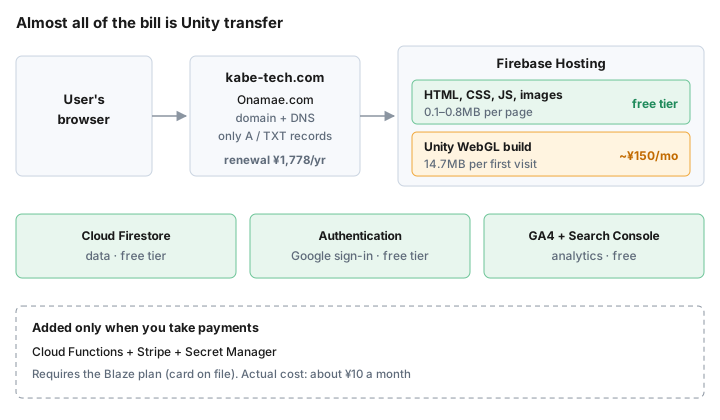
- Domain from Onamae.com, hosting on Firebase Hosting. Data and sign-in are Firebase too; analytics are GA4 and Search Console
- A regular web app with no payments fits inside Firebase's free tier. The only bill is the domain renewal (¥1,778 a year)
- Almost all of kabe-tech.com's bill is transfer of the Unity WebGL build: about ¥150 a month
- Adding payments (Stripe) means switching to the Blaze plan. The extra cost came to about ¥10 a month
Introduction
Once a web app is finished, the next question is where to put it so it doesn't cost money every month. Rental servers and VPSs bill monthly, and there are too many free hosts to choose from.
kabe-tech.com serves PoseMirror (turns a photo into a 3D pose), SkeletonCheck (a body-frame check) and this blog from one domain. This article shows that setup and what it actually costs. The numbers come from the Google Cloud billing screen and the Onamae.com dashboard (as of September 2026). Onamae.com is a large Japanese domain registrar; any registrar works the same way.
Services and What Each One Does
| Role | Service |
|---|---|
| Domain and DNS | Onamae.com |
| Hosting | Firebase Hosting |
| Data | Cloud Firestore |
| Sign-in | Firebase Authentication |
| Analytics | GA4, Search Console |
| Source code | GitHub |
DNS stays at Onamae.com. When you add a custom domain in the Firebase console, it shows the records to set. Enter them in Onamae.com's DNS settings and Firebase issues the SSL certificate automatically. kabe-tech.com uses just these two lines:
kabe-tech.com.  A    199.36.158.100
kabe-tech.com.  TXT  "hosting-site=pose-mirror-app"
The values differ per project, so use the ones Firebase shows you. Hosting settings live in firebase.json. The main parts are dropping .html from URLs and the header that lets the Unity build be served.
{
  "hosting": {
    "public": "public",
    "cleanUrls": true,
    "trailingSlash": false,
    "headers": [
      {
        "source": "**/Build/*.unityweb",
        "headers": [{ "key": "Content-Encoding", "value": "br" }]
      }
    ]
  }
}
Why These Choices
Why Onamae.com (and Not GitHub Pages)
The biggest reason: to apply for Google AdSense you need a domain of your own. AdSense manages sites per domain and folds subdomains into their parent. GitHub Pages' username.github.io and Firebase's default project.web.app are parts of domains someone else owns. People in the AdSense community do report being unable to add a github.io subdomain. If you plan to run ads, you need your own domain from day one.
I bought it from Onamae.com because it is a Japanese service with a Japanese dashboard and support. kabe-tech.com cost ¥0 for the first year and renews at ¥1,778 a year.
GitHub Pages does support custom domains. I still skipped it for two reasons. First, you can't set your own response headers. Serving a Brotli-compressed Unity WebGL build needs Content-Encoding: br, as in the firebase.json above. Second, my repository is private, and GitHub Pages on a private repository needs a paid plan (GitHub Pro). Firebase Hosting covers both for free.
A Regular Web App Fits in the Free Tier
Firebase's free Spark plan allows 10GB of storage and 10GB/month of transfer (360MB a day) on Hosting, 1GiB of storage and 50K reads a day on Firestore, and 50K monthly active users on Authentication. Estimating kabe-tech.com's non-Unity pages as "page views × bytes per page" gives about 40MB a day, roughly a tenth of the limit.
Adding Unity Is What Costs Money
94% of kabe-tech.com's Firebase bill is transfer of the Unity WebGL build behind PoseMirror (¥453 of ¥482 over the last 90 days). Measured on a first visit, a blog post transfers 0.08MB and SkeletonCheck 0.76MB, while PoseMirror transfers 14.7MB. Nearly all of that is the Unity build (.wasm 6.8MB + .data 7.7MB).
Dividing the free transfer by that size gives a rough count of free loads:
10GB ÷ 14.7MB ≈ 680 loads/month (about 23 a day)
Past 680 first-time loads of the Unity page in a month, you are over the free tier. In the week of September 18–24, 2026, PoseMirror had 187 users and Hosting as a whole transferred 4.49GB (about 640MB a day). Transfer beyond the free tier costs $0.15 per GB, and Hosting billed ¥453 over the last 90 days, or about ¥150 a month.
To keep serving past the free tier, you switch to the pay-as-you-go Blaze plan and register a credit card. If a Spark project goes over 10GB of transfer in a month, the site is disabled until the next month after a short grace period (Firebase Hosting usage, quotas, and pricing). A smaller build also means more free loads. How I shrank mine is in [Unity] How to Shrink a WebGL Build for the Web.
When You Add Payments
PoseMirror has a paid plan, with payments through Stripe. Processing payments and storing the Stripe secret key require Cloud Functions and Secret Manager, and both are only available on the Blaze plan. Actual usage stays almost entirely within the free tier: over the last 90 days Secret Manager billed ¥26 and Functions ¥3.
What It Actually Costs
| Item | Cost |
|---|---|
| Domain (Onamae.com) |
¥1,778/year (¥0 the first year) |
| Hosting transfer (Unity's share) |
About ¥150/month |
| Functions + Secret Manager (payments) |
About ¥10/month |
| Everything else on Firebase |
¥0 |
The Firebase monthly figures are the last 90 days of actual charges on the Google Cloud billing screen (before credits), divided by three: ¥453 for Hosting and ¥29 for Secret Manager and Functions combined. Prices change, so check the current terms on the Firebase pricing page.
Wrapping Up
If all you need is to publish a web app built with HTML and JavaScript, a domain from a registrar plus Firebase Hosting leaves the domain renewal as your only monthly cost. Apps that need data storage or sign-in still fit in the Firestore and Authentication free tiers.
Money comes in when you serve something heavy per visit (Unity, in my case) or use Cloud Functions for things like payments. Both came to a few hundred yen a month or less. If you are about to launch, start on the free Spark plan and switch to Blaze when you get close to the limit.
Here's a web app running on this setup.
A Unity WebGL app served from Firebase Hosting. Turn one photo into a 3D pose.
▶ Try PoseMirrorRelated (English):
- [Unity] How to Shrink a WebGL Build for the Web — the settings that took transfer from 50.79MB to 14.20MB
- Best free 3D pose reference web apps for artists (2026) — the app in this article next to other tools
Related (Japanese):
- 【Firebase】Unity WebGLを無料で公開する手順 — deploying to Firebase Hosting