Free Online 3D Pose Maker — From a Photo, in Your Browser (Apps vs. Web Tools Compared)
Published: July 2, 2026 (Updated October 5, 2026)
For: Artists who want a free 3D pose maker, aren't sure whether a mannequin app is worth installing, and want to know which browser tools are actually usable.
In short: 3D pose makers split into tools where you move the joints by hand and tools that build the pose from a photo, and again into installed apps and browser tools. If posing by hand slows you down, PoseMirror (free, no sign-up, runs in the browser) makes a pose from a single dropped photo. This guide covers the photo workflow, compares three browser tools (WEB POZU / PoseKit / PoseMirror), and draws the line on when an installed app like Magic Poser or Design Doll is worth it.
Why "making" a 3D pose is harder than it sounds
You sit down to draw a character, and first you need a pose to work from. Getting a real person to hold a pose for a long time is hard, and the photo you took yourself is a single front-on shot. Building a 3D mannequin from scratch means dragging one joint at a time while the depth drifts, and the pose never quite comes out. Plenty of drawing time disappears right there.
PoseMirror is a tool I built to get a pose from a photo instead of posing joints by hand. Later in this article I also cover the other options: manual web tools and installed apps.
How to make a 3D pose from a photo (with PoseMirror)
PoseMirror is a free 3D pose maker you just open in your browser. No install, no account.
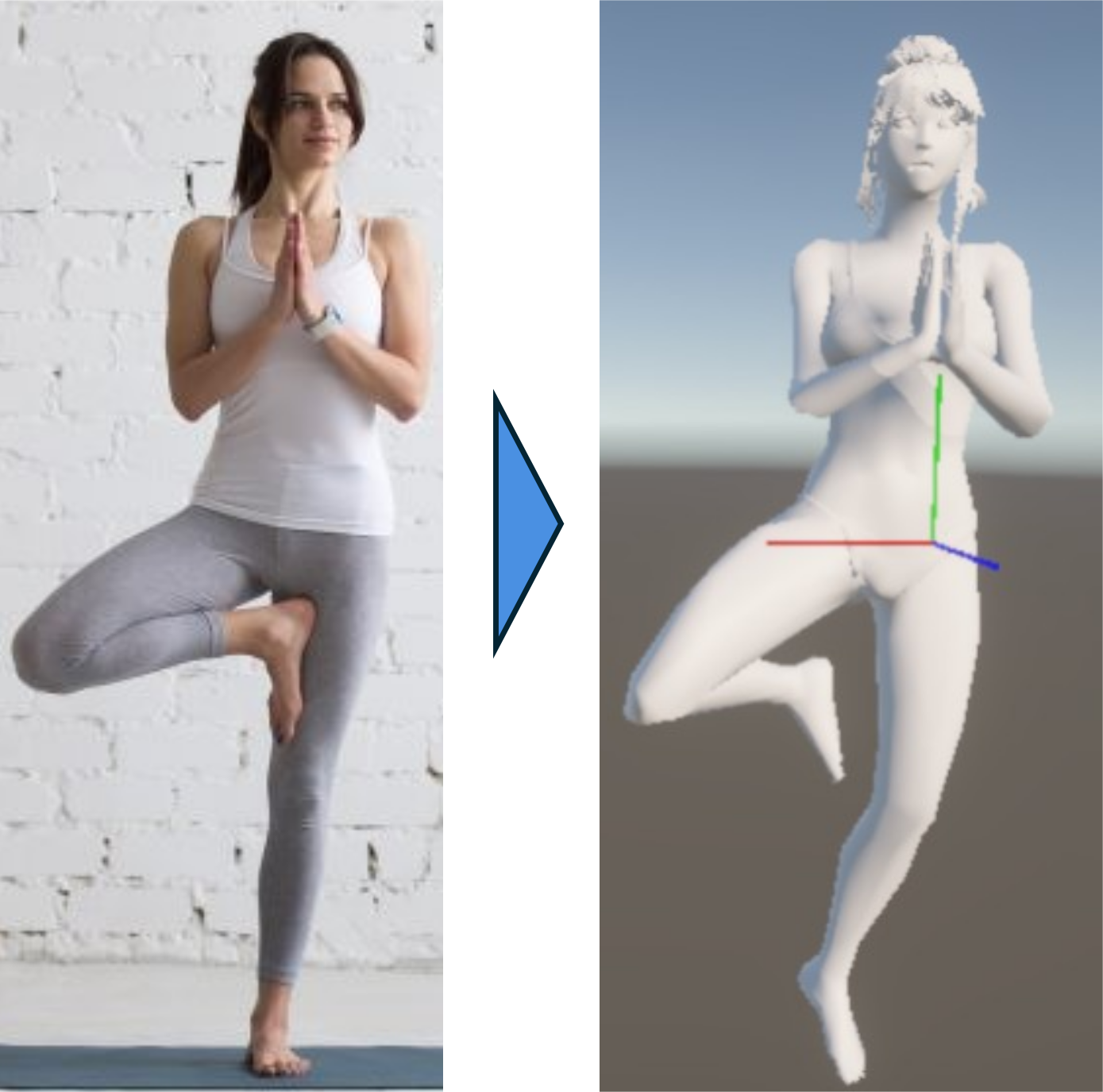
▲ Build a pose from one photo, then check the 3D model from any angle
- Grab a photo: one image with the pose you want, whether you shot it yourself or found it as reference
- Load it: pick it with "Choose a photo" or drag and drop it onto the page. "Run Detection" reads the joints, and "Send to Model Viewer" applies them to the mannequin
- Rotate, check, and fix: spin the mannequin to find the angle you're drawing. If a joint is off, click the mannequin and rotate the joint with the buttons
No photo handy? You can start by picking from the library of 353 poses (108 standing, 36 sitting, 6 kneeling, 18 lying, 157 action, 18 couple, 10 sample). 178 of them are free; the 175 action and couple poses are PRO. You can save the finished pose as a PNG, and keep it as a favorite on your device (1 on the free plan, up to 100 on PRO).
Try it with a single photo.
▶ Open the free 3D pose makerWhat it's bad at
Fine finger shapes aren't reproduced. The photo is read as 33 full-body points, and finger joints aren't among them (hand direction is captured). With several people in a photo, only one person's skeleton is taken. A single person, full body in frame, with a clear outline works best.
Three web tools that run in the browser
Here are three 3D mannequins and pose makers you can use in a browser with no install.
WEB POZU: if you want to pose the joints yourself
WEB POZU is a 3D mannequin built for the browser. It has male, female, and unisex models, 20+ presets, finger control, camera settings, and history. No login. You pose the joints by hand, so the posing work itself is still on you.
PoseKit: if you want a pose from a photo, exported as FBX
PoseKit is a web service published by machine-learning engineer Toyofuku (@Yeq6X). It estimates a pose from a photo, lets you change head-to-body proportions, and exports FBX. If you want to take the pose into Blender or your own 3D setup, that's the reason to pick it. It requires a Google login (checked June 2026).
PoseMirror: if you want a pose from a photo with no login
PoseMirror takes the same photo-based approach as PoseKit, with no login and no install. It exports PNG, plus BVH for CLIP STUDIO PAINT on the PRO plan.
| WEB POZU | PoseKit | PoseMirror | |
|---|---|---|---|
| Login | Not needed | Google login required | Not needed |
| Pose from photo | ✕ (by hand) | ○ | ○ |
| Export | Image | FBX | PNG / BVH (PRO) |
| Presets | 20+ | — | 353 (178 free) |
- Want to pose the joints yourself → WEB POZU
- Need FBX for a 3D setup → PoseKit (worth the login)
- Want a pose from your own photo right away, no login → PoseMirror
If you landed here because you couldn't log in to PoseKit, PoseMirror can stand in. If FBX is the goal, though, it can't.
When an installed app is worth it
The standard mannequin apps in the stores have strengths that browser tools don't have yet.
- Magic Poser — four models (male, female, manga boy, manga girl) plus props like desks and chairs. The fastest way to block out compositions with several characters
- Easy Poser — anime-styled models that work as-is for character art, with multi-person preset poses
- Design Doll — fine control over proportions and body type, for reference that matches your original character
- ArtPose — realistic muscle definition, suited to fine-art figure study
What they share is strength in building things up over time. Day-to-day drawing, though, mostly needs a quick check like "what does this arm look like from behind?", and that doesn't call for an install or an account.
Here's how I'd split it:
- Placing props, combining several characters, or building a body type → an app (Magic Poser, Design Doll)
- Seeing the pose from your photo at another angle → PoseMirror (no joint posing at all)
- No photo, and you want to pose the joints yourself → WEB POZU
I'd check in the browser first and install an app only if that falls short. A side-by-side of more tools is in Best Free 3D Pose Reference Web Apps for Artists.
FAQ
Q. Is there a free 3D pose maker? A. Yes. Free browser-based 3D pose makers include PoseMirror, which builds a pose from a photo automatically, and manual tools like WEB POZU, SetPose, PoseMy.Art, and Magic Poser. PoseMirror needs no install or login and makes a pose from a single photo.
Q. Can I use a drawing mannequin without installing an app? A. Yes. PoseMirror and WEB POZU both run entirely in the browser, with no install and no account. Open the page in a PC or phone browser and the 3D mannequin starts right there.
Q. Is there a no-login web tool that makes a pose from a photo? A. That's PoseMirror. It reads the joint positions from your photo and poses a 3D model. No account is needed. The photo is analyzed inside your browser and is not sent to a server for analysis.
Q. What if I need FBX export? A. For FBX, PoseKit is the better fit. PoseMirror exports PNG, plus BVH for CLIP STUDIO on the PRO plan.
Q. Does it work on a phone browser? A. Yes. It supports the major browsers (Chrome, Safari, Edge) and works on phones with WebGL 2.0.
Summary
With a 3D pose maker, where you usually stall is building the pose from zero by hand. If you have a photo, that step can be automated. Without one, picking a preset and adjusting it is still faster than starting from nothing. Look at manual web tools or apps only once you need to build things in detail. It's free, needs no sign-up, and runs in the browser, so try dropping in one of your own photos.
Skip the posing — start from a photo.
No photo handy? You can start by picking from the 353-pose library.
▶ Make a pose from a photoRelated:
- Best Free 3D Pose Reference Web Apps for Artists — a detailed tool comparison
- CLIP STUDIO Pose Scanner Not Accurate? Re-capture the Pose From a Photo — reading a photo that broke in the Pose Scanner with another tool