9 Free Websites to Pose a 3D Model (2026): Drawing Mannequins Tested Side by Side
Published: March 8, 2026 (last updated: September 29, 2026)
When you want to draw a figure in a particular pose, it's hard to find someone who will hold that pose for a long time.
Searching for photo references can also eat up an afternoon without ever turning up the exact angle you need.
That's where websites that let you pose a 3D model come in: you can set up the pose you want and look at it from any angle.
In this article, I introduce 8 free websites for posing a 3D model, plus 1 site that builds a 3D pose from a photo, along with what I found when I actually tried each one.
What you'll learn
- How to choose a site for posing a 3D model
- 8 free sites for posing a 3D model, and what each offers for free
- A site that builds a 3D pose from a photo
What is a 3D posing website?
A 3D posing website shows a human-shaped 3D model (a 3D drawing mannequin) in your browser and lets you change its pose and viewing angle freely.
There is nothing to install: open the page on a computer or a phone and it works.
Unlike a wooden mannequin, its joints move much like a real body, so it can shrug its shoulders or round its back.
Artists use these sites for pose reference, figure drawing practice and checking compositions.
4 things to check when choosing a free 3D posing site
There are a lot of these sites, and it's easy to get stuck deciding which one to use.
Here are the 4 points worth checking before you pick one.
1. How you make the pose
3D posing sites fall into three groups depending on how the pose is made.
Ways to make a pose
- Bend the joints yourself to build a pose
- Choose a ready-made pose and rotate it
- Build the pose from a photo
If you want to shape poses in detail, choose a site where you can move the joints. If you only want something to look at, a site where you pick ready-made poses is enough.
2. How much you get for free
Most sites are free to start, but some limit how often you can use the pose library or how many poses are included.
For example, you might get 5 uses of the pose library per session, or only 11 free poses.
If you plan to use a site for a while, check how far the free tier goes.
3. Which languages it supports
Some sites are English-only, and some keep Japanese labels in places.
Choose a site whose interface is in a language you read comfortably.
4. Whether it works on a phone
Browser-based sites open on a phone, but some layouts are hard to use on a small screen.
If you want to use one on the go or on a tablet, check how it looks on mobile first.
8 free websites to pose a 3D model
Here are 8 free websites where you can pose a 3D model.
Free 3D posing websites
- Magic Poser
- PoseMy.Art
- DESSIN POSE
- SetPose
- JustSketchMe
- mirohani poser
- WEB POZU
- POSEMANIACS
I opened each site on September 29, 2026 and ran the same three checks: bending joints, loading a pose from the library, and opening it on a phone.
Here is the comparison table. "○" means it works on the free tier, and "△" means it works with conditions.
| Site | Pose by hand | Pose library | From a photo | English | Phone |
|---|---|---|---|---|---|
| Magic Poser | ○ | ○ 25 poses | × | ○ | △ pushes the app |
| PoseMy.Art | ○ | △ 5 uses per session | × | ○ | ○ |
| DESSIN POSE | × view and rotate only | ○ | × | ○ | ○ |
| SetPose | ○ | △ 11 basic poses | × | ○ | ○ |
| JustSketchMe | ○ | × Pro only | × | ○ | ○ |
| mirohani poser | ○ | ○ load shared poses | × | △ some Japanese labels | ○ |
| WEB POZU | ○ | × your own saves only | △ trace over a photo | ○ | △ large panel |
| POSEMANIACS | × view and rotate only | ○ | × | ○ | ○ |
| PoseMirror (mine) | ○ with buttons | △ 178 of 353 poses | ○ | ○ | △ 3D view sits below the photo |
All nine sites opened and were usable right away with no account. "Phone" is the result on an iPhone/Pixel-sized screen. PoseMirror is covered later in Introducing PoseMirror, which builds a 3D pose from a photo.
Let's go through them one by one.
1. Magic Poser: a posing tool that also runs in the browser
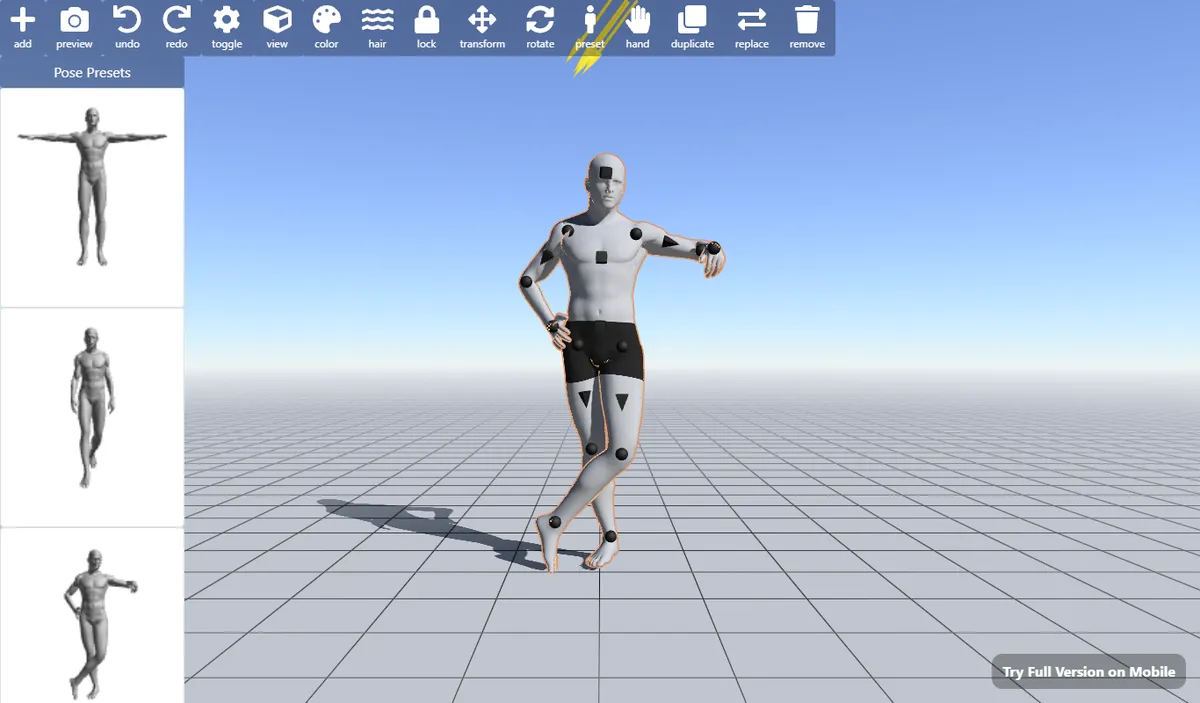
Source: Magic Poser Web
Magic Poser at a glance
- The browser version of a well-known mobile posing app
- Menus are available in English and Japanese
- 25 pose presets are free to use
- More models and props require in-app purchases in the mobile app
Magic Poser is a posing tool where you drag joint handles to move a 3D model.
| Name | Magic Poser Web |
|---|---|
| Features |
|
| Main use | Pose reference for illustration and comics, checking compositions |
| Languages | English, Japanese and more |
| Price | The web version is free (the mobile app has in-app purchases: Pro and Master tiers) |
| Platforms | Web browser (mobile app for iOS and Android) |
| URL | https://webapp.magicposer.com/ |
| Notes | Opening it in a phone browser shows a prompt to download the app |
Choose "preset" and then "Pose Presets" in the top menu, and a list of poses appears on the left.
One click on a pose applies it to the model, so it's easy to pick up even on your first visit.
Of all the sites I tried, this was the easiest to use: free, with a pose library, and no sign-up.
Keep in mind that the web version is a trimmed-down entry point, and adding more models or props requires the mobile app's in-app purchases.
Good for
- People who want to make poses for free with no setup
- People who like to start from a preset and adjust it
2. PoseMy.Art: a posing tool with a library of 6,300+ poses
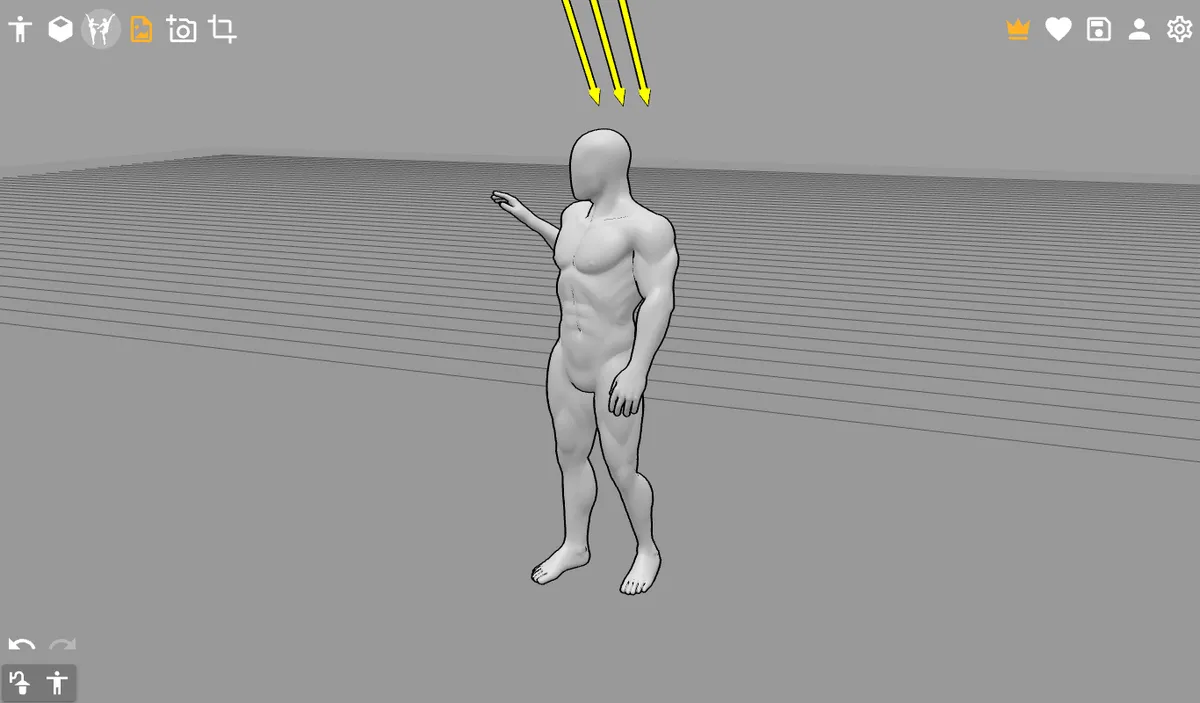
Source: PoseMy.Art
PoseMy.Art at a glance
- A simple, icon-driven interface
- Menus in many languages, including English and Japanese
- Inverse kinematics: moving the hand pulls the elbow and shoulder along
- The free tier limits the pose library to 5 uses per session
PoseMy.Art is a posing tool for building pose references with 3D models.
| Name | PoseMy.Art |
|---|---|
| Features |
|
| Main use | Pose reference for illustration and comics, poses for AI image generation |
| Languages | English, Japanese and more |
| Price | Free (Premium: $15/month, $150/year or $99.99 lifetime) |
| Platforms | Runs in the web browser, so it works on any OS |
| URL | https://posemy.art/ |
| Notes | The 6,300+ pose library and anime, animal and realistic models are aimed at Premium |
Click the model and colored spheres appear on every joint; drag them to bend.
The whole interface is a row of icons along the top and bottom of the screen.
The pose library is large, ranging from standing poses to poses for a skeleton model.
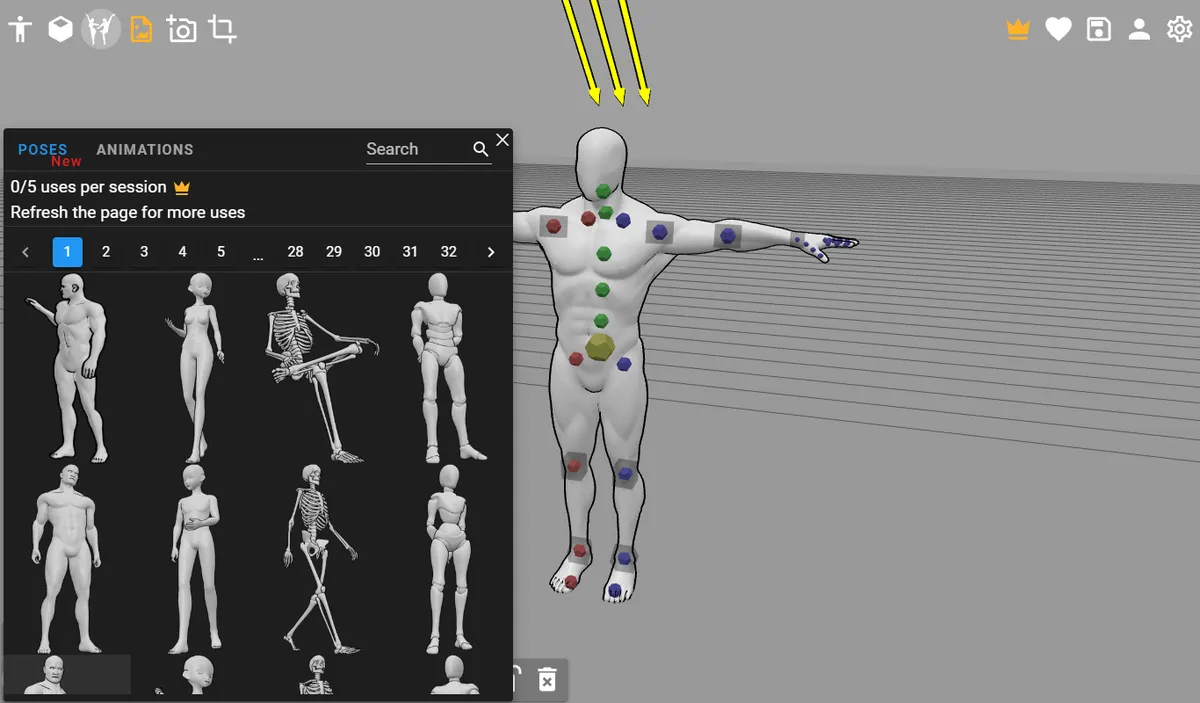
Source: PoseMy.Art
Keep in mind that on the free tier, the pose library shows "5 uses per session."
Reloading the page resets the count, but browsing the library at length is really meant for Premium.
Good for
- People who want to bend joints and shape poses in detail
- People who want an OpenPose skeleton for AI image generation
3. DESSIN POSE: a 3D figure pose reference site
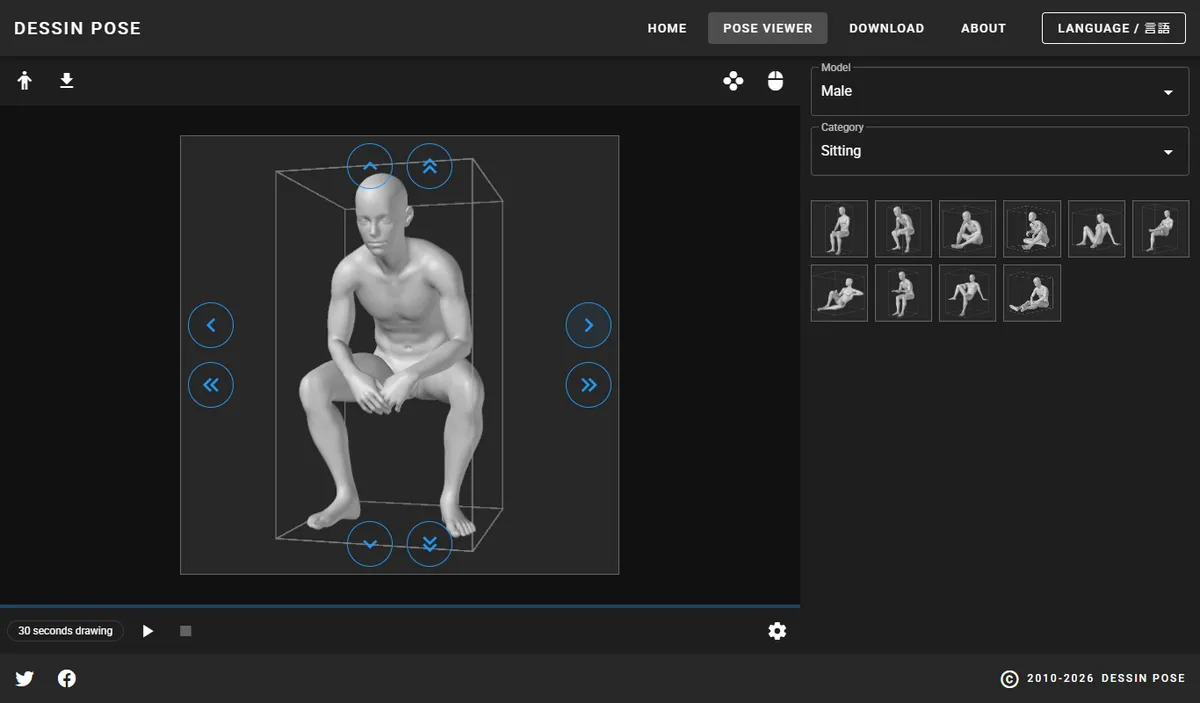
Source: DESSIN POSE
DESSIN POSE at a glance
- View ready-made poses from many angles
- 5 categories with 10 poses each
- Arrow buttons are the only controls, so it's light on a phone
- Every feature is free
DESSIN POSE is a pose reference site where you view 3D figure poses from many angles.
| Name | DESSIN POSE |
|---|---|
| Features |
|
| Main use | Figure drawing practice, pose reference for illustration and comics |
| Languages | English and Japanese |
| Price | Free |
| Platforms | Runs in the web browser, so it works on any OS |
| URL | https://www.dessinpose.com/ |
| Notes | You may publish and sell work based on the pose images, including copies and tracings (redistributing the images themselves is not allowed) |
Running since 2010, the site offers a "pose viewer" where you turn pre-rendered poses with arrow buttons.
You can't move the joints yourself, but in exchange it loads quickly and works comfortably on a phone.
There are male and female models, each with 10 poses in each of 5 categories.
Pose categories
- Standing
- Crouching
- Kneeling
- Sitting
- Lying
A "30 seconds drawing" mode switches poses every 30 seconds, which is handy for gesture practice.
Good for
- People who want to pick and look rather than build poses
- People looking for reference they can copy or trace
4. SetPose: a pose maker that bends the way a body does
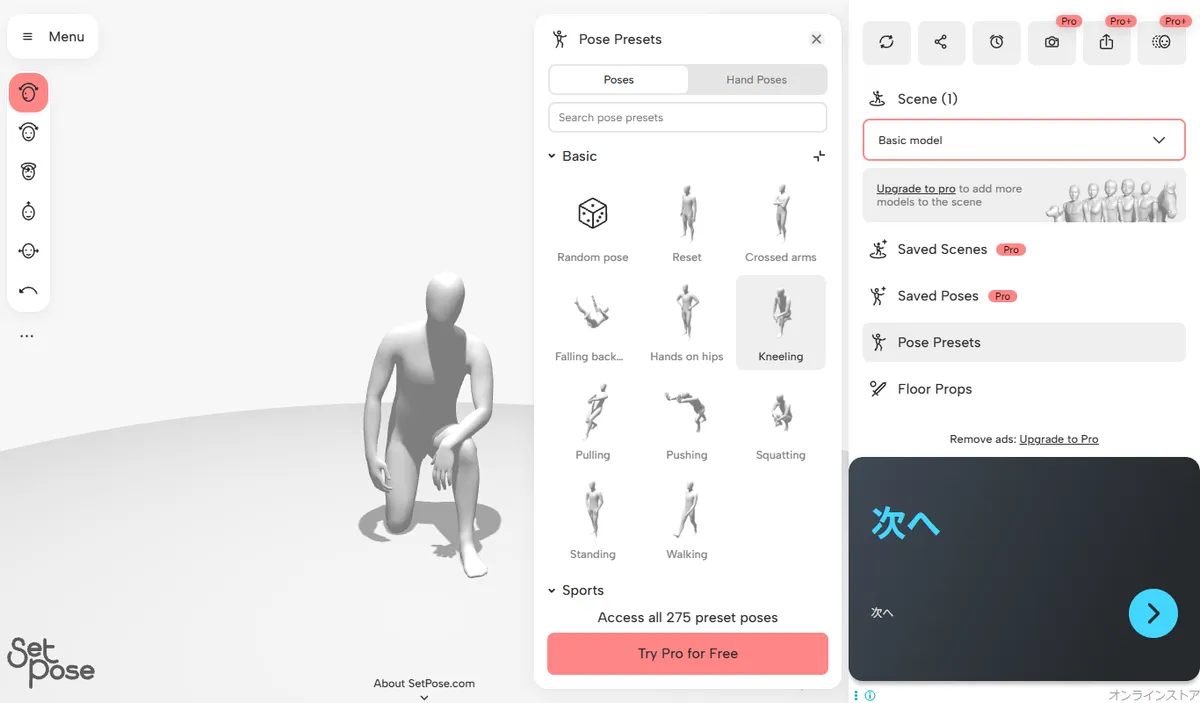
Source: SetPose
SetPose at a glance
- Move joints by switching between bend, tilt and rotate
- Joints resist bending in directions a real body can't
- 11 basic pose presets are free
- English interface
SetPose is a relatively new 3D pose maker, launched in May 2026.
| Name | SetPose |
|---|---|
| Features |
|
| Main use | Pose reference for illustration, drawing practice |
| Languages | English |
| Price | Free (Pro: $7/month, Pro+: $20/month, $199 lifetime) |
| Platforms | Web browser (Android app also available) |
| URL | https://setpose.com/ |
| Notes | The free version shows ads |
It often ranks near the top for "pose maker," and it was launched on Hacker News.
You grab a body part and switch between Bend, Tilt and Rotate as you move it, which makes natural-looking poses easier to get.
Keep in mind that only the 11 "Basic" poses are free; the 275-pose library and realistic models are Pro features.
Good for
- People who care most about joints bending naturally
- People who want a clean, modern interface
5. JustSketchMe: a posing tool with its controls labeled on screen
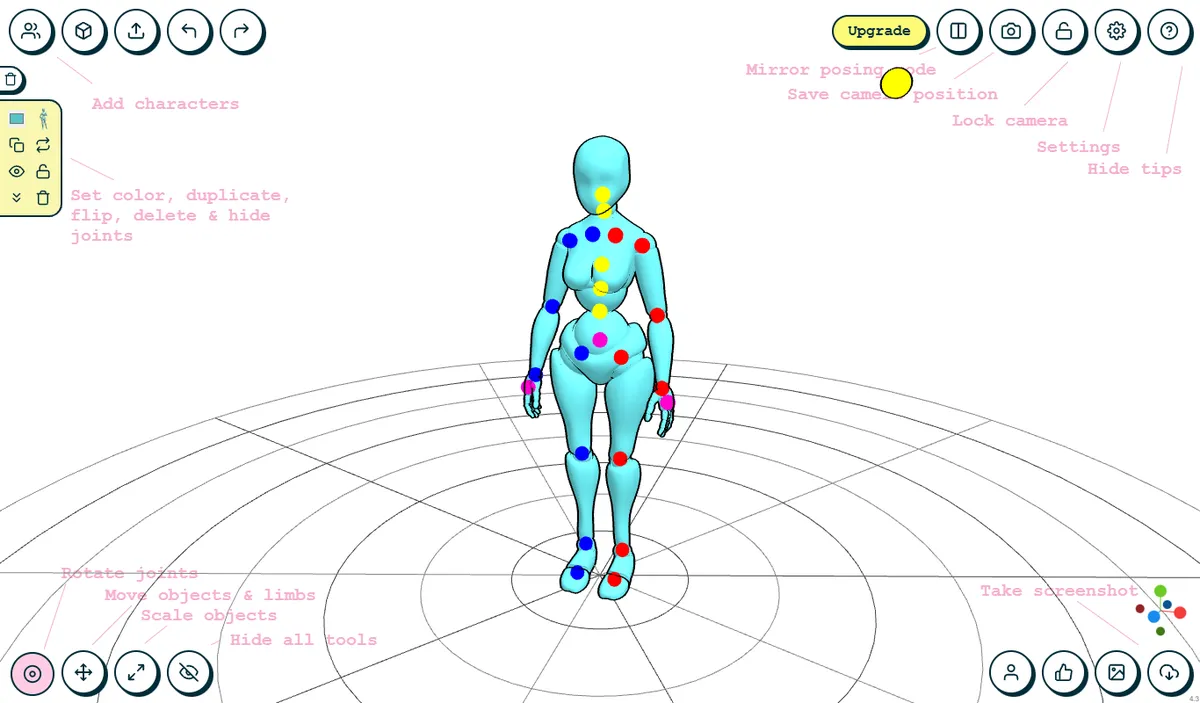
Source: JustSketchMe
JustSketchMe at a glance
- Every button's purpose is written on screen when it opens
- Posing joints by hand is free
- The 200+ pose library and saving are Pro features
- English interface
JustSketchMe is a character posing tool that has long been popular with artists.
| Name | JustSketchMe |
|---|---|
| Features |
|
| Main use | Pose reference for illustration |
| Languages | English |
| Price | Free (Pro plan available) |
| Platforms | Web browser, iOS, Android, Mac, Windows |
| URL | https://justsketch.me/ |
| Notes | Pro adds 30+ models, 200+ poses, props and saving |
The labels written on screen mean you never have to guess what a button does.
For free, you get hand posing and that's it.
When I opened "Poses" at the bottom right, went into the Pose library and picked a pose, an upgrade screen appeared.
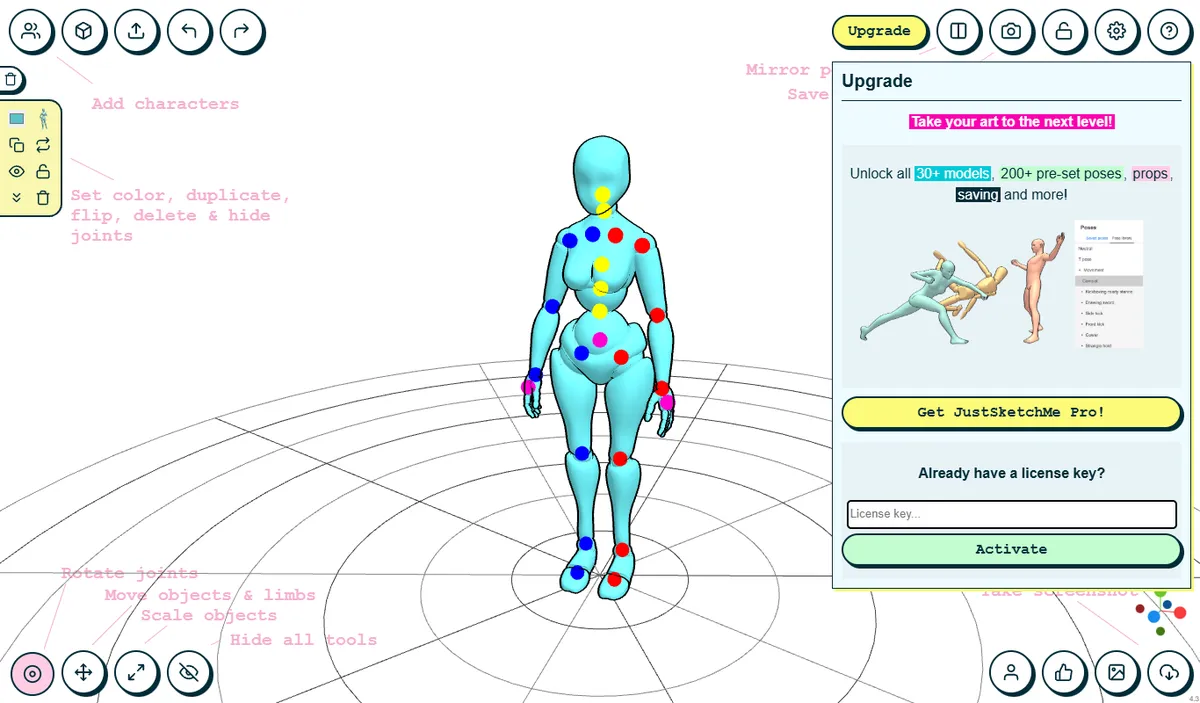
Source: JustSketchMe
Keep in mind that using the pose library requires buying Pro.
Good for
- People who don't mind building every pose from scratch
- People who also want the same tool as a desktop or mobile app
6. mirohani poser: a mannequin site with a shared pose gallery
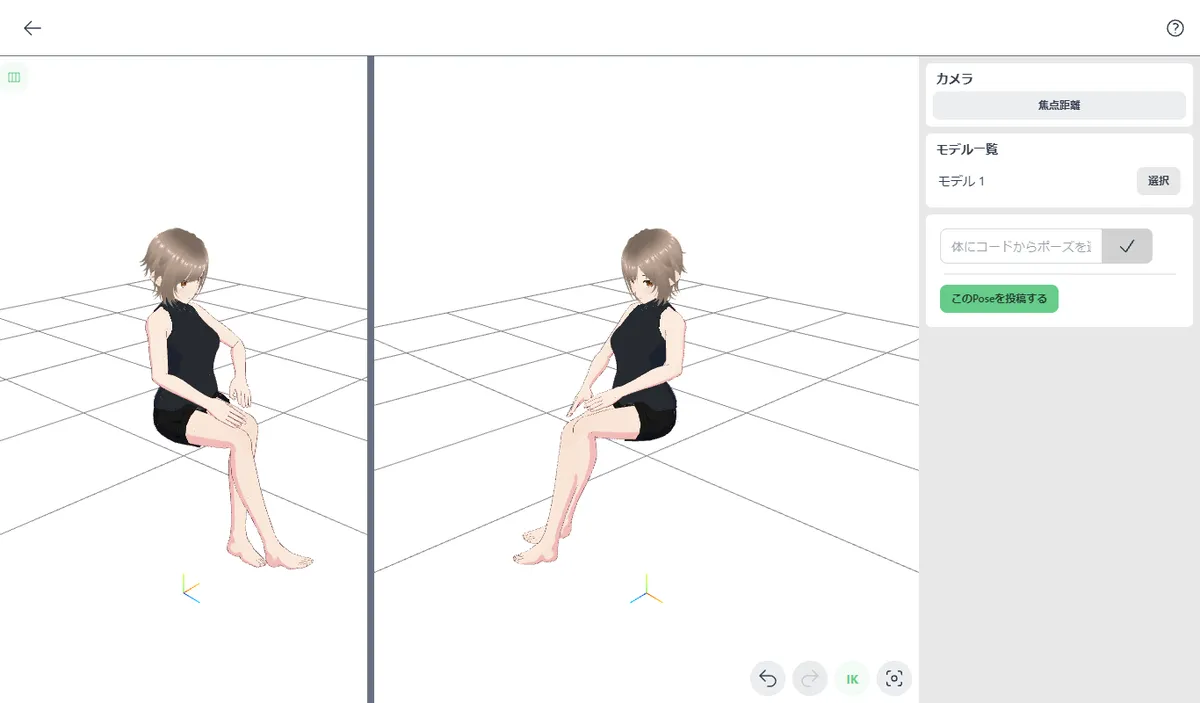
Source: mirohani poser
mirohani poser at a glance
- Pose an anime-style 3D model
- Load poses that other users have shared
- Split the view to see two angles at once
- Every feature is free
mirohani poser is a free drawing mannequin site that works right in the browser.
| Name | mirohani poser |
|---|---|
| Features |
|
| Main use | Pose reference for illustration and comics |
| Languages | Japanese (Pose Studio kept Japanese labels with the browser set to English) |
| Price | Free |
| Platforms | Runs in the web browser, so it works on any OS |
| URL | https://mirohani.com/ |
| Notes | No account needed to load and pose |
Each shared pose has a code starting with "figures:". Paste it into the box on the right side of Pose Studio, and that pose loads onto your model.
The split view, which lets you adjust while watching the front and side at the same time, is genuinely handy.
There's a login option on the site, but loading and posing worked without one.
Good for
- People who want to pose an anime-style model
- People who want to borrow poses other artists made
7. WEB POZU: a 3D mannequin you drive with the keyboard
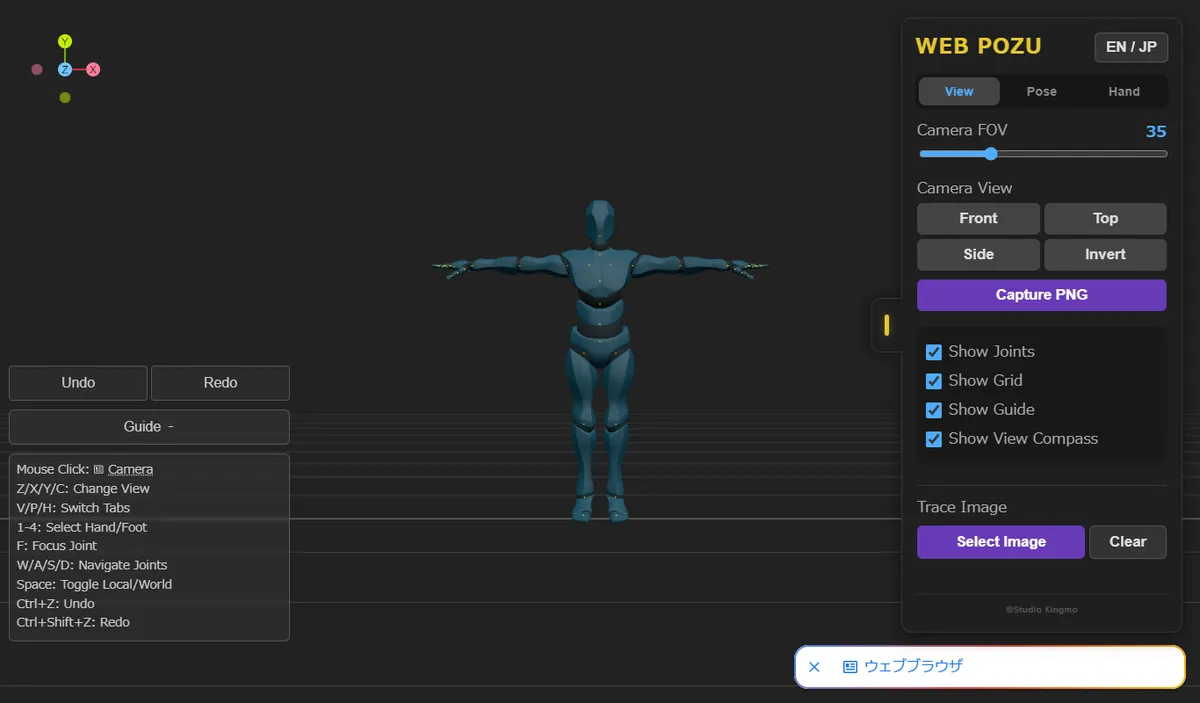
Source: WEB POZU
WEB POZU at a glance
- Select and move joints with keyboard shortcuts
- "Trace Image" puts a photo behind the model to match by hand
- Switches between English and Japanese
- No pose library; you save your own poses
WEB POZU is a 3D posing tool that runs in the browser.
| Name | WEB POZU |
|---|---|
| Features |
|
| Main use | Pose reference for illustration, matching a pose to a photo |
| Languages | English and Japanese |
| Price | Free |
| Platforms | Web browser (layout designed for computers) |
| URL | https://kingmo.jp/apps/pozu/ |
| Notes | Shows ads |
W/A/S/D moves between joints and Space toggles the rotation axis, so it's built for keyboard work on a computer.
"Trace Image" places a photo behind the model so you can line the joints up with it, which helps when you want to match a reference photo.
Keep in mind that on a phone the settings panel covers half the screen, so it's best used on a computer.
Good for
- People comfortable with keyboard shortcuts on a computer
- People who want to match a pose by tracing over a photo
8. POSEMANIACS: 3D pose reference that shows the muscles
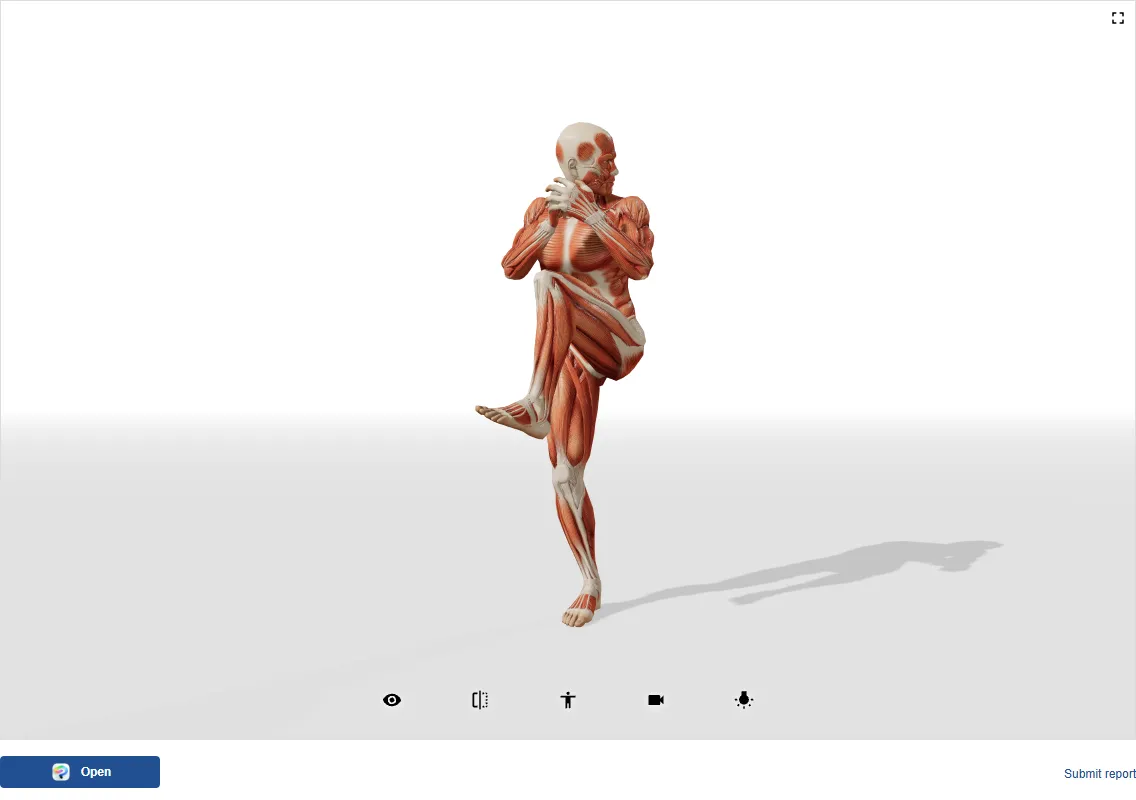
Source: POSEMANIACS
POSEMANIACS at a glance
- View poses on a figure that shows its muscles
- Choose from detailed categories such as baseball, ballet and crossed arms
- Rotate poses freely in the viewer
- Viewing poses is free, with no account
POSEMANIACS is a long-running 3D pose reference site with a muscle-anatomy figure.
| Name | POSEMANIACS |
|---|---|
| Features |
|
| Main use | Studying muscles, figure drawing practice, pose reference |
| Languages | English, Japanese and more |
| Price | Viewing poses is free |
| Platforms | Runs in the web browser, so it works on any OS |
| URL | https://www.posemaniacs.com/ |
| Notes | The site also promotes paid courses and seminars |
Seeing how the thigh muscles tense in a given pose, not just the silhouette, is something none of the other sites offer.
You can't pose the figure yourself, but you can pick from detailed categories and spin each pose around in the viewer.
Good for
- People who want to study muscle shapes along with the pose
- People looking for sports and other action poses
Introducing PoseMirror, which builds a 3D pose from a photo
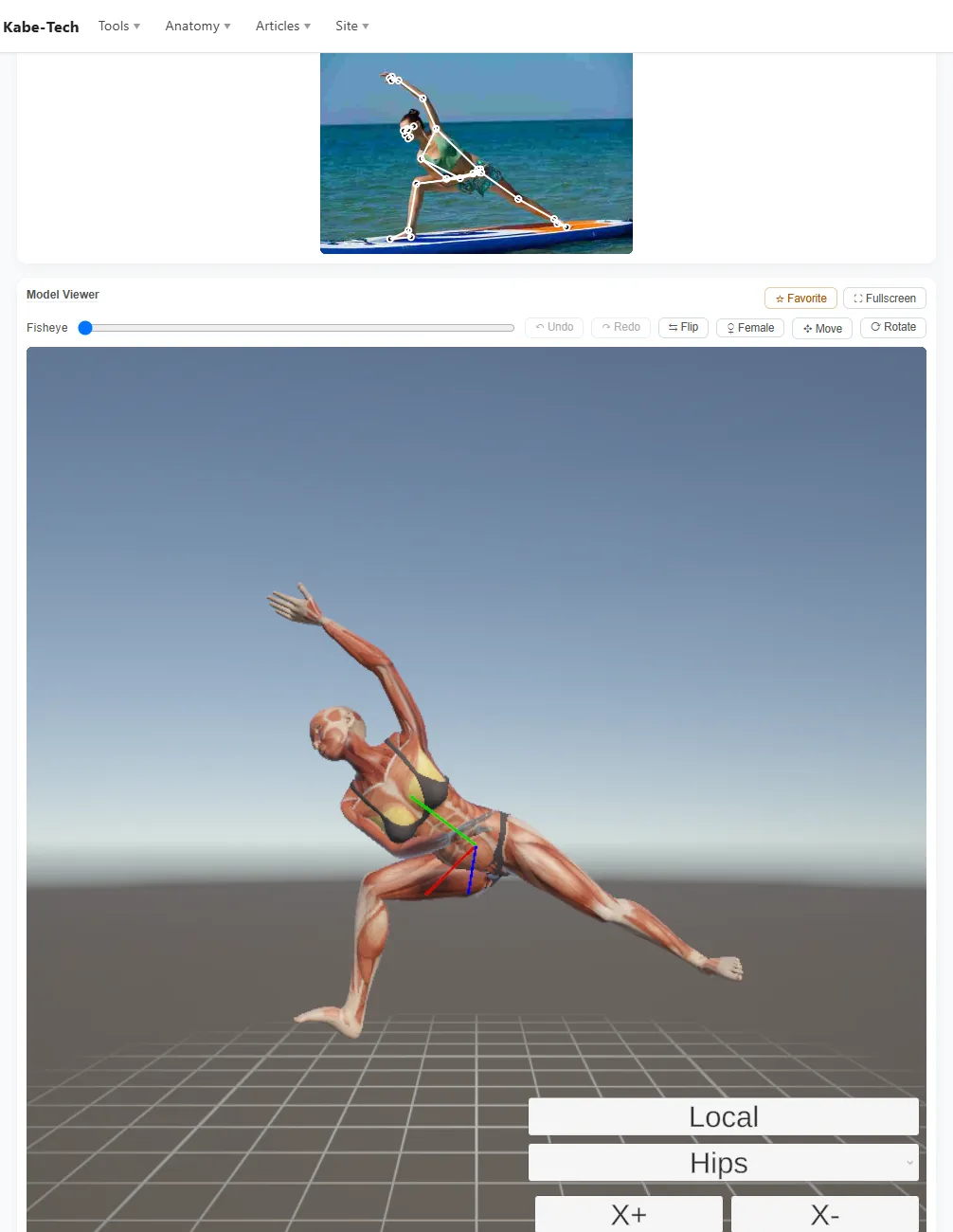
Source: PoseMirror
PoseMirror, which I develop at Kabe-Tech, analyzes a photo you already have and builds the same pose on a 3D model.
Choose a photo, press "Run Detection" and then "Send to Model Viewer," and you can rotate the result to any angle.
PoseMirror at a glance
- Analyze a photo and apply the pose to a 3D model
- Fix the result joint by joint with buttons
- 178 of the 353 poses in the library are free
- Photo detection and joint editing are free, need no account and have no usage limits
The pose it builds isn't final: you can fix it by hand.
Click a body part to select the joint, then turn it step by step with the X, Y and Z buttons.
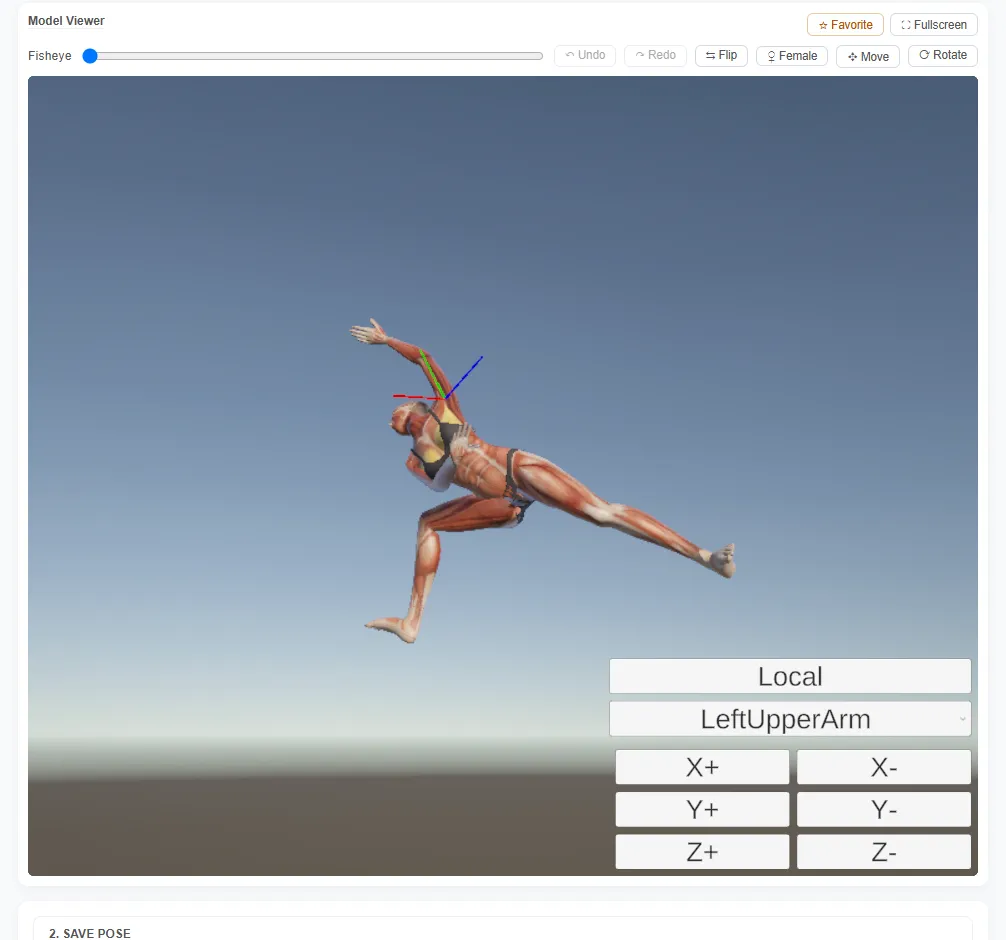
Source: PoseMirror
No photo? Pick a pose from the library on the "Browse" tab.
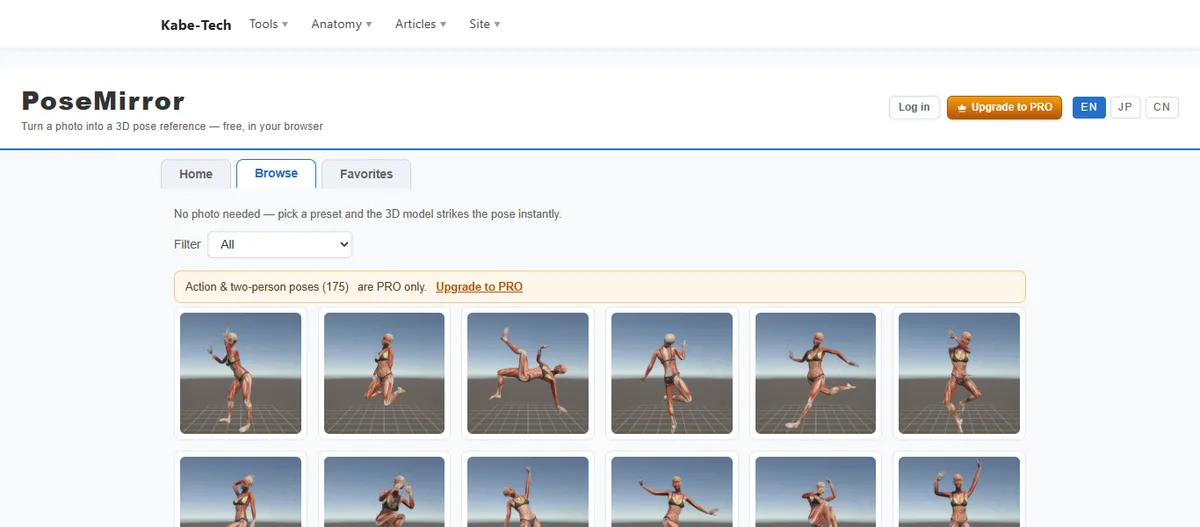
Source: PoseMirror
| Name | PoseMirror |
|---|---|
| Features |
|
| Main use | Turning a photo's pose into 3D, pose reference for illustration and comics |
| Languages | English, Japanese and Chinese |
| Price | Free (PRO plan: $6.99/month) |
| Platforms | Runs in the web browser, so it works on any OS |
| URL | https://kabe-tech.com/poseMirror/en |
| Notes | The 175 action and two-person poses, BVH export, and saving more than one favorite (up to 100) are PRO |
Keep in mind that on a phone, the photo picker comes first and the 3D view is further down the page.
Detailed hand and finger shapes also can't be read from a photo, and photos with several people are handled one person at a time for now.
Want the pose from your photo in 3D?
Photo detection and joint editing are free, with no sign-up.
▶ Open PoseMirrorOther tools can build a pose from a photo too: PoseKit requires a Google sign-in, and CLIP STUDIO PAINT's "Pose Scanner" requires owning CLIP STUDIO. If the Pose Scanner's accuracy frustrates you, see Browser alternatives to the CLIP STUDIO Pose Scanner.
Which one fits what you need?
Here are my picks by purpose.
To make poses for free with no setup
Magic Poser (web) and PoseMy.Art have the most generous free tiers of the tools where you move the joints yourself.
If natural joint movement matters most
SetPose resists bending in directions a body can't, and JustSketchMe is friendly thanks to its on-screen labels.
If you only want to pick and look
DESSIN POSE lets you just choose and rotate, and POSEMANIACS adds the muscles.
To borrow other people's poses on an anime-style model
mirohani poser lets you load poses other users have shared.
To recreate the pose in a photo you have
PoseMirror builds it from the photo and lets you tidy it up by hand. WEB POZU also works if you'd rather trace over the photo yourself.
FAQ
Q. Is there a free website where I can pose a 3D model? A. Yes. All nine sites in this article opened in the browser and were usable right away with no account. For bending joints yourself, Magic Poser (web), PoseMy.Art, mirohani poser and WEB POZU are free; for rotating ready-made poses, DESSIN POSE and POSEMANIACS are free.
Q. Which free 3D pose tools are in English? A. Eight of the nine have a full English interface. mirohani poser's Pose Studio kept its Japanese labels even with my browser set to English (as of September 29, 2026).
Q. Which 3D pose sites work on a phone? A. All nine opened in a phone browser. DESSIN POSE, POSEMANIACS, PoseMy.Art, JustSketchMe, SetPose and mirohani poser worked without layout problems. Magic Poser shows a prompt to download its app, and WEB POZU's settings panel covers half the screen.
Q. Can any of these turn a photo into a 3D pose? A. Of the nine, only PoseMirror analyzes a photo and builds the pose on a 3D model, and you can then adjust the joints by hand. WEB POZU lets you place a photo behind the model and match it manually. Outside this list, there's PoseKit (Google sign-in required) and CLIP STUDIO's Pose Scanner.
Summary
In this article, I introduced 8 free websites for posing a 3D model, plus PoseMirror, which builds a 3D pose from a photo.
Summary
- Magic Poser (web) gives you 25 pose presets for free
- PoseMy.Art has a huge pose library, but the free tier allows 5 uses per session
- DESSIN POSE lets you view 10 poses in each of 5 categories from many angles
- SetPose bends naturally, but only 11 presets are free
- JustSketchMe lets you pose by hand for free; the pose library is Pro
- mirohani poser loads shared poses onto an anime-style model
- WEB POZU is keyboard-driven and lets you trace over a photo
- POSEMANIACS shows poses on a figure with visible muscles
- PoseMirror builds a 3D pose from a photo and lets you fix the joints by hand
3D posing websites range from simple viewers of ready-made poses to tools where you control every joint, and tools that start from a photo.
Each site differs in features and in how much it gives you for free, so pick the one that fits what you want to draw.
Related articles:
- Free Online 3D Pose Maker: From a Photo, in Your Browser: apps vs. web tools
- Browser alternatives to the CLIP STUDIO Pose Scanner: when the Pose Scanner isn't accurate enough
- MediaPipe Pose: the complete 33-landmark list: the landmarks PoseMirror's detection is built on