MediaPipe Pose 33 Landmarks: The Complete Guide — Index List and Measured Behavior the Docs Don't Cover
Published: May 2, 2026 (Updated: October 5, 2026)
For: Developers using MediaPipe Pose Landmarker / anyone implementing pose estimation
This article is for you if:
- You want the index and body part of each of the 33 landmarks
- You can't decide between the lite, full, and heavy models
visibilitycomes back empty, the depthzlooks wrong, or people in your photos aren't detected
Introduction
My 3D drawing-mannequin app, PoseMirror, takes a single photo, gets 33 points from MediaPipe Pose Landmarker, and turns them into a pose on a 3D model.
What kept tripping me up while building it wasn't misremembering indices. It was behavior the official docs don't mention. Code I wrote to use visibility was reading undefined every time. An arm that is perfectly straight in the photo bent at the elbow on the 3D model. Photos without a visible face didn't detect the person at all.
This guide reorganizes what the official docs already cover (the 33-point list, what the outputs mean, the three models) and adds the undocumented behavior, measured on 120 people photos from Unsplash and shown as figures.
The 33 landmarks (official)
Full-body layout
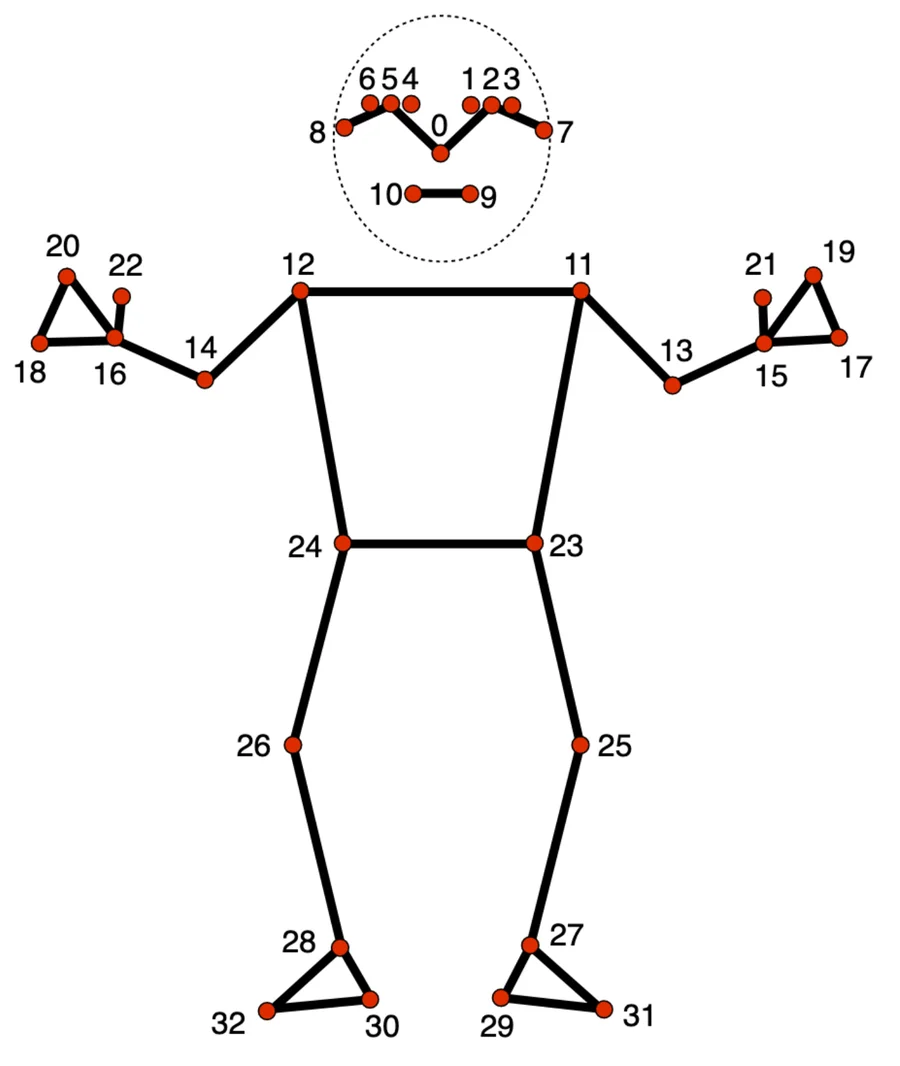
Source: Pose landmark detection guide (Google, CC BY 4.0)
Each hand has four points — wrist, pinky, index, and thumb — and the wrist, pinky, and index form a triangle.
Face and head (0–10)
| Index | Official name |
|---|---|
| 0 | nose |
| 1 | left eye (inner) |
| 2 | left eye |
| 3 | left eye (outer) |
| 4 | right eye (inner) |
| 5 | right eye |
| 6 | right eye (outer) |
| 7 | left ear |
| 8 | right ear |
| 9 | mouth (left) |
| 10 | mouth (right) |
Upper body (11–22)
| Index | Official name |
|---|---|
| 11 | left shoulder |
| 12 | right shoulder |
| 13 | left elbow |
| 14 | right elbow |
| 15 | left wrist |
| 16 | right wrist |
| 17 | left pinky |
| 18 | right pinky |
| 19 | left index |
| 20 | right index |
| 21 | left thumb |
| 22 | right thumb |
Points 17–22 are only enough to tell which way the hand is facing. If you need finger bending, use the dedicated Hand Landmarker (21 points per hand) alongside it.
Lower body (23–32)
| Index | Official name |
|---|---|
| 23 | left hip |
| 24 | right hip |
| 25 | left knee |
| 26 | right knee |
| 27 | left ankle |
| 28 | right ankle |
| 29 | left heel |
| 30 | right heel |
| 31 | left foot index |
| 32 | right foot index |
What the output contains (official)
Pose Landmarker returns two sets of coordinates per person.
| Output | x, y | z | Origin and units |
|---|---|---|---|
landmarks |
Normalized to 0–1 by image width and height | Depth. Smaller values are closer to the camera. Roughly the same scale as x | Only z uses the midpoint of the hips as origin |
worldLandmarks |
Real-world 3D coordinates | Same as left | Origin at the midpoint of the hips, in meters |
Each point carries visibility (the likelihood that the point is visible in the image — inside the frame and not occluded). The official docs also list presence, the detection confidence, as an output.
The main options:
| Option (Web name) | Default | Meaning |
|---|---|---|
runningMode |
IMAGE |
IMAGE / VIDEO / LIVE_STREAM |
numPoses |
1 | Maximum number of people to detect |
minPoseDetectionConfidence |
0.5 | Threshold for person detection |
minPosePresenceConfidence |
0.5 | Threshold for treating a pose as present |
minTrackingConfidence |
0.5 | Threshold for keeping tracking from the previous frame in video |
outputSegmentationMasks |
false | Whether to also output a person segmentation mask |
Processing runs in two stages. A person detector first estimates the midpoint of the hips, the radius of a circle enclosing the whole body, and the tilt of the line joining shoulders and hips, which locates the person. That region is passed to the landmark model. In video, the detector only runs on the first frame and when the person is lost; every other frame derives the region from the previous frame's landmarks.
Code example (Tasks API, browser)
import { PoseLandmarker, FilesetResolver } from "https://cdn.jsdelivr.net/npm/@mediapipe/tasks-vision@1.0.1";

const vision = await FilesetResolver.forVisionTasks(
  "https://cdn.jsdelivr.net/npm/@mediapipe/tasks-vision@1.0.1/wasm"
);
const poseLandmarker = await PoseLandmarker.createFromOptions(vision, {
  baseOptions: {
    modelAssetPath:
      "https://storage.googleapis.com/mediapipe-models/pose_landmarker/pose_landmarker_heavy/float16/1/pose_landmarker_heavy.task",
    delegate: "GPU",
  },
  runningMode: "IMAGE",
  numPoses: 1,
});

const result = poseLandmarker.detect(imageElement);
const lm = result.landmarks[0];        // 33 points relative to the image
const world = result.worldLandmarks[0]; // 33 points in meters
if (lm) {
  const leftShoulder = lm[11]; // { x, y, z, visibility }
  console.log(leftShoulder.x, leftShoulder.y, leftShoulder.visibility);
}
Plenty of articles still use the legacy @mediapipe/pose package (receiving results via pose.onResults(...)). For new code, use the Tasks API above.
The three models: lite / full / heavy (official)
| Model | File size* | Accuracy PCK@0.2 (yoga / dance / HIIT) | Latency Pixel 3 / MacBook Pro 2017 |
|---|---|---|---|
| lite | 5.8MB | 90.2% / 92.5% / 93.5% | 20ms / 25ms |
| full | 9.4MB | 95.5% / 96.3% / 95.7% | 25ms / 27ms |
| heavy | 30.7MB | 96.4% / 97.2% / 97.5% | 53ms / 38ms |
*File sizes aren't in the docs; I measured the .task files at the download URLs in October 2026. Accuracy and latency come from the legacy MediaPipe Pose documentation.
All three take the same input sizes: 224×224 for the person detector and 256×256 for the landmark model.
What the docs don't cover (measured)
The results below come from running 120 people photos from Unsplash (dance, yoga, sports, sitting, crouching, and so on) through all three models.
- Environment: Windows 11 / Chromium (Playwright) / GeForce RTX 4070 / Core i7-13700F
- Library:
@mediapipe/tasks-vision1.0.1 (several versions compared for thevisibilitysection only)
1. Older versions don't output visibility
Even if your code is written to use visibility, an older browser version gives you undefined. I checked the keys on each point with the heavy model across versions.
@mediapipe/tasks-vision version |
Keys per point |
|---|---|
| 0.10.0 – 0.10.10 | x, y, z only |
| 0.10.11 – 1.0.1 | x, y, z, visibility |
The presence value listed in the docs was not attached to individual points, even in 1.0.1.
A check like lm.visibility > 0.5 treats every joint as hidden on older versions, because undefined > 0.5 is false. Code that fills in a default with lm.visibility ?? 1 does the opposite and treats every joint as visible. Neither throws an error, which makes the bug easy to miss.
2. lite vs. heavy shows up in which skeletons come out right
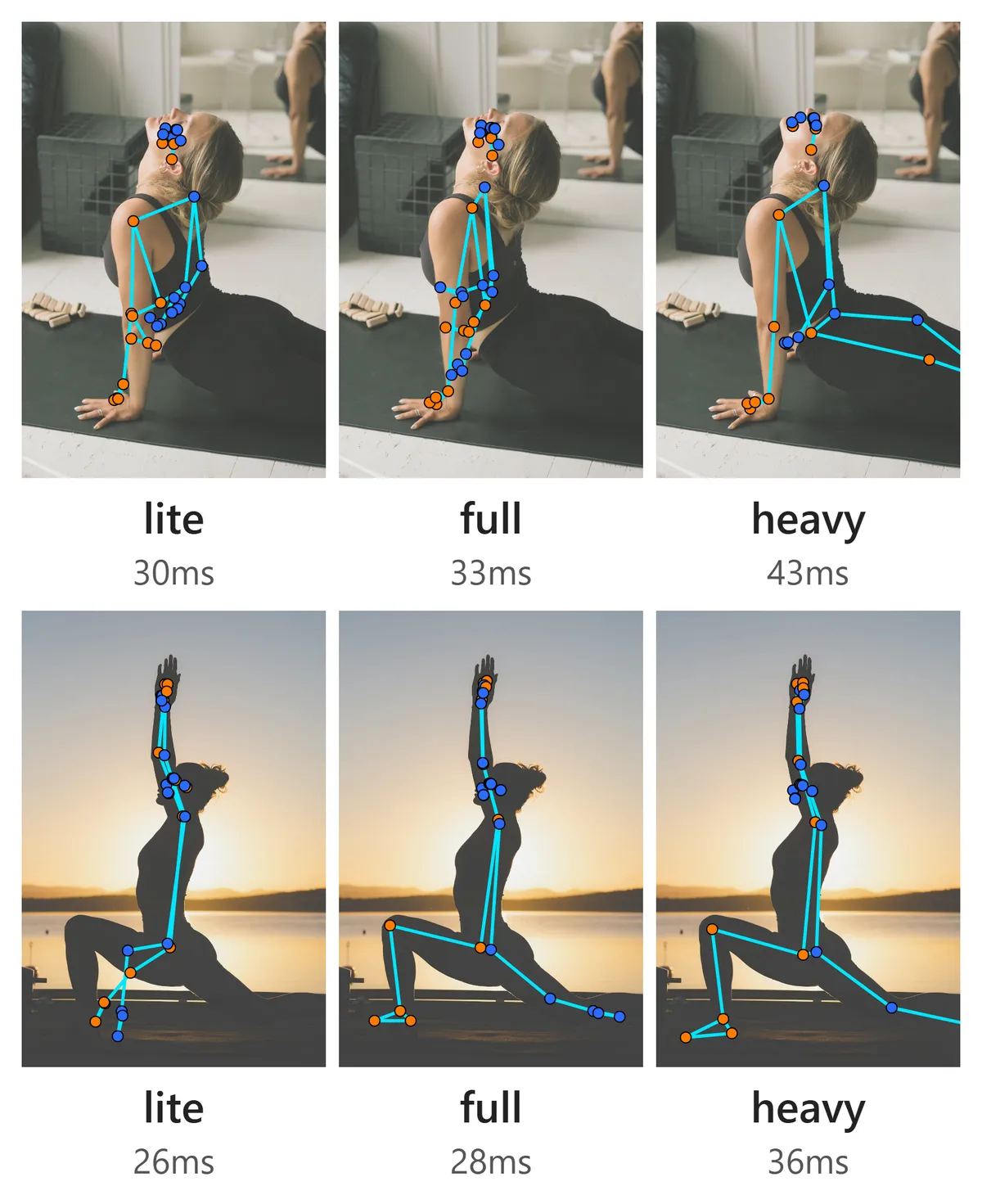
In the yoga photo on the first row, lite and full lose the legs and the skeleton collapses onto the arms. Only heavy gets the legs. In the backlit lunge on the second row, only lite's legs fall apart.
Across all 120 photos:
| Model | Photos detected | Latency (median) |
|---|---|---|
| lite | 88 / 120 | 31ms |
| full | 85 / 120 | 33ms |
| heavy | 90 / 120 | 42ms |
The number of detected photos barely changes. The difference is whether the skeleton is right on the photos that were detected. As in the figure, lite tends to fail by finding the person but putting the legs in the wrong place.
PoseMirror analyzes one photo at a time; it doesn't have to process dozens of frames per second like video. So I chose heavy for correct skeletons over a 10ms gain. The catch is file size: at 30.7MB it's about five times lite, and the first load is slower for it.
3. CPU and GPU detect different photos
Setting baseOptions.delegate to "CPU" or "GPU" changed which photos were detected at all.
| Model | Detected on CPU only | Detected on GPU only |
|---|---|---|
| lite | 10 photos | 4 photos |
| full | 10 photos | 5 photos |
| heavy | 7 photos | 7 photos |
With heavy, CPU and GPU both detected 90 photos, but 7 on each side were different photos. Running GPU twice, the detected/not-detected result matched on all 120 photos. Since the same environment gives the same result every time, I take this to be a difference in how CPU and GPU compute, not random noise (I haven't confirmed the root cause).
A photo that works on your machine may fail in a user's environment. When reproducing a bug report, match the delegate first.
4. Using worldLandmarks depth as-is throws off the elbows
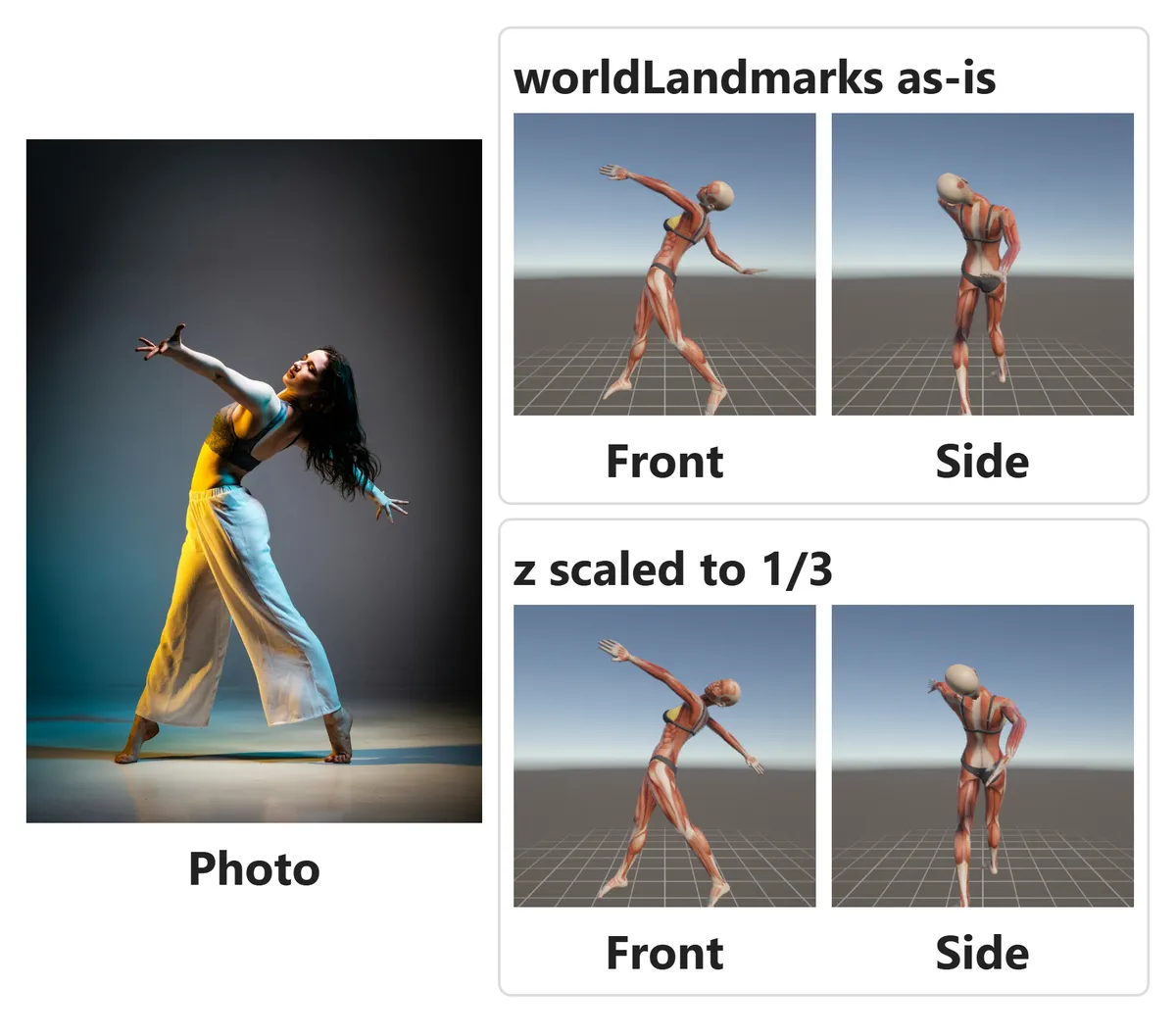
In the photo, the arm reaching to the lower right is straight. Using worldLandmarks as-is on the 3D model bent that arm at the elbow and dropped the hand near the hip (top right).
The error comes from the depth z. Across 20 poses built from photos in PoseMirror, elbow angles were off from the photo by +34.1° on average, and all 20 were off by more than 15°. x and y are the positions in the image itself, but z can only be inferred from a single photo, which I believe is why its error is larger.
So I convert the x and y of landmarks back to pixels and scale only z down to 1/3 before passing it to the 3D model. On the same 20 poses, the average elbow error dropped to +10.3° (bottom right). The 1/3 factor matches the default (pose_model_z_depth_scale = 3) of XR Animator, a motion-capture app for VTubers.
// Back to image pixels, then scale only z to 1/3 (z shares x's scale, so multiply by width)
const px = lm.map(p => [p.x * imgW, p.y * imgH, (p.z * imgW) / 3]);
The direction of the error depends on the photo. Among the 120 photos, some straight arms bent (like the one in the figure) and some bent arms straightened. Measure on photos from your own use case to pick the scale factor.
5. Half the photos with no person found worked once given a region
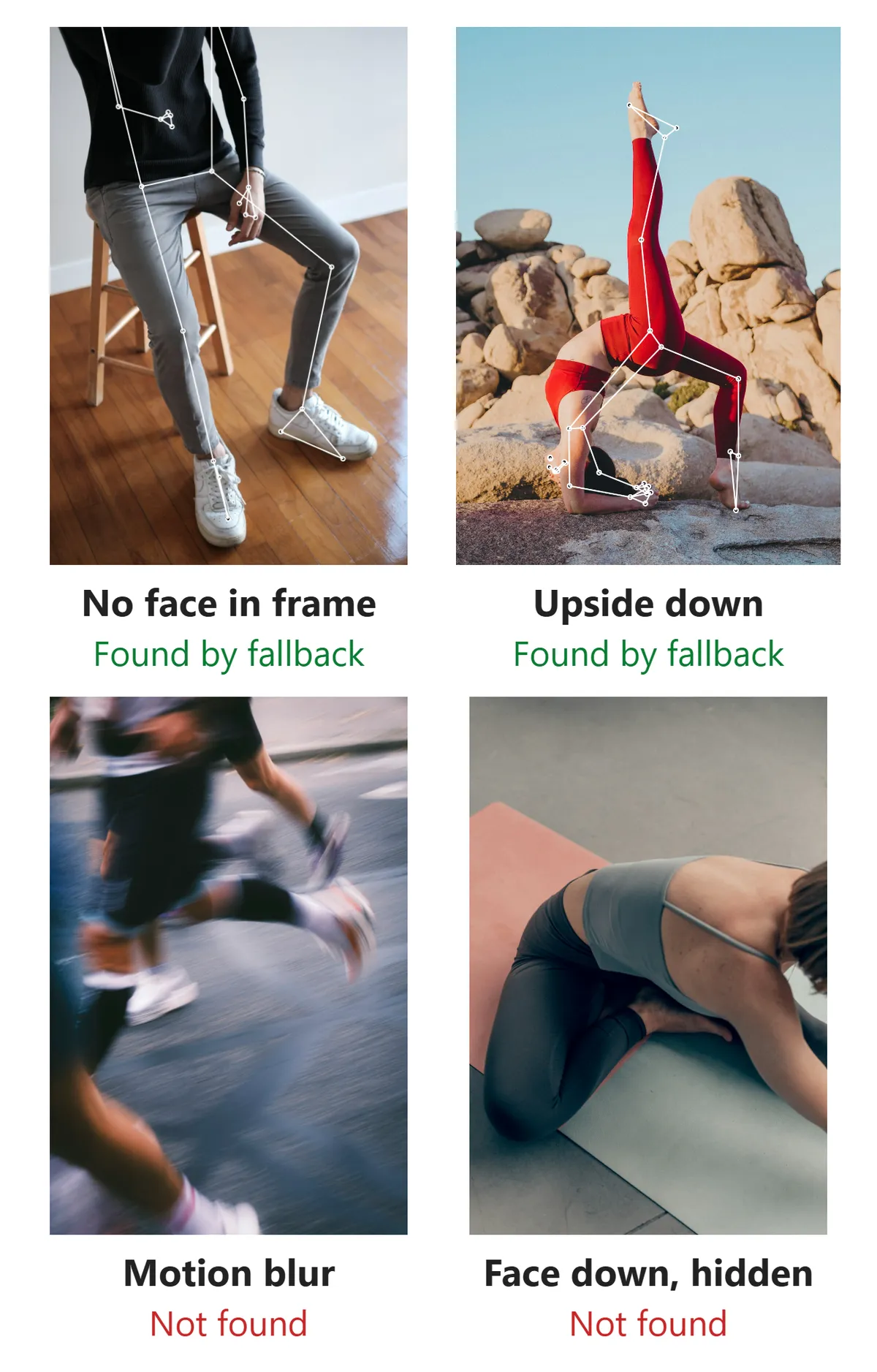
In 28 of the 120 photos, no model found a person. Lined up, the common cases are photos showing only the body below the neck, upside-down poses, people small in the frame, and motion blur.
When a clearly visible person still isn't detected, it's because the first-stage person detector drops it. The second-stage landmark model returns a skeleton as long as it's given a region. So when MediaPipe can't find a person, PoseMirror gets the body position from MoveNet (17 points), another Google model, and passes that region directly to MediaPipe's landmark model.
This fallback recovered 14 of the 28 photos (9 via MediaPipe's landmark model, 5 by substituting MoveNet's 17 points). The two on the left of the figure are examples. Blurred photos and the person lying face down on the mat stayed undetected even with the fallback.
6. Hidden joints still get coordinates, but lower visibility
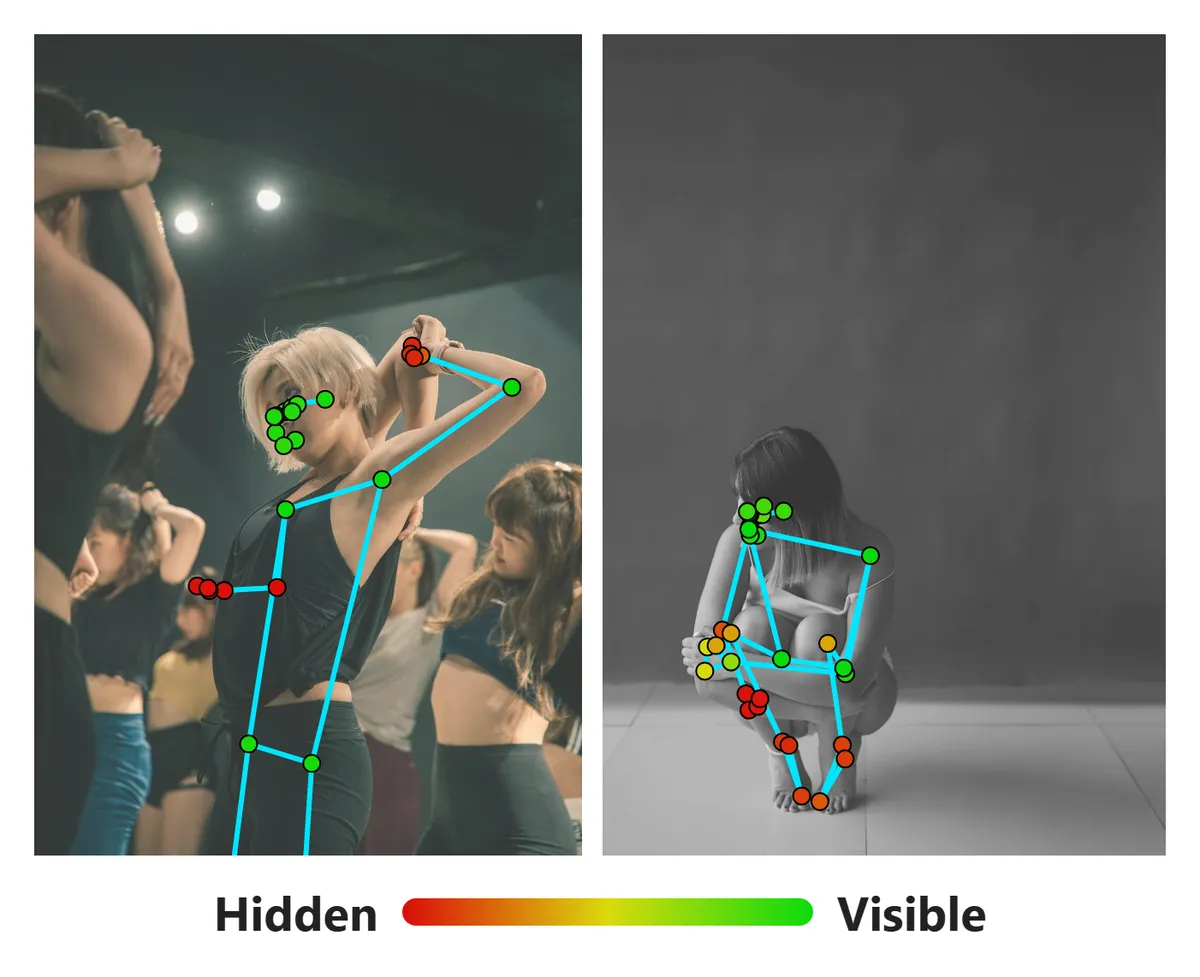
With a version that outputs visibility (0.10.11 and later), I colored each joint by its value. Green joints are visible; red joints are hidden.
For the dancer on the left, the wrist behind her head and the far arm in the shadow of her body are red. For the crouching person on the right, the ankles and heels hidden behind the knees are red. Hidden joints still come back with coordinates, but the positions are guesses. Check visibility to decide whether to use those coordinates or fill them in some other way.
The points PoseMirror uses
PoseMirror's 3D model uses 23 of the 33 points.
| Purpose | Points |
|---|---|
| Head direction | 0 (nose), 7, 8 (ears) |
| Arms | 11–16 (shoulders, elbows, wrists) |
| Hand direction | 17–20 (pinky and index) |
| Torso and legs | 23–28 (hips, knees, ankles) |
| Foot direction | 29–32 (heels, toes) |
The eyes (1–6) and mouth (9, 10) aren't used, because the nose and ears already set the head direction. The thumbs (21, 22) aren't used either, since pinky and index are enough for the hand direction.
Summary
The official diagram and tables are all you need for the indices. The time goes into the behavior around them. When you build something new, checking things in this order saves rework.
First, check your @mediapipe/tasks-vision version. At 0.10.10 or earlier there's no visibility, so any check on it silently does nothing. Next, decide on the delegate and test locally with the same setting, because CPU and GPU detect different photos. If you're driving a 3D model, don't use worldLandmarks depth as-is; compare against the photo to decide how much to scale z. And if many photos come back with no person, adding a fallback that passes a region from another model recovers about half of them.
You can try everything in this article by dropping a single photo into PoseMirror.
Watch 33 landmarks turn into a 3D model.
Drop in one photo; the heavy model analyzes it and poses the 3D mannequin.
▶ Pose a 3D mannequin from a photoRelated (Japanese):
- Driving a 3D pose with MediaPipe (Unity WebGL) — the full Unity integration
- Testing PoseMirror's AI pose accuracy — a detection-accuracy report
Related (English):
- Best free 3D pose reference web apps for artists — how PoseMirror, built on this tech, compares to other tools
References
- Pose landmark detection guide (MediaPipe)
- Pose landmark detection guide for Web (MediaPipe)
- MediaPipe Pose (legacy docs, accuracy and latency tables)
- XR Animator
Photos: From Unsplash. Mathilde Langevin, Matea Brajdić, Morgan Petroski, syahmi syahir, Wesley Tingey, Pierre-Antoine FRANCK, Alina Rubo, Chris Yang, SHAYAN Rostami