Free Pose App Alternative — Make Poses in Your Browser (No Install)
Published: July 2, 2026
For: Artists who want a free pose app but would rather not install anything, and who want a pose viewer to rotate reference from any angle.
TL;DR: Most "pose apps" are things you install on your phone (Magic Poser, Easy Pose, and so on). If you'd rather not install or pay and just want to make and rotate a pose in your browser, Pose Mirror builds a pose from a photo — free, no sign-up. Here's how the app versions and the web version compare.
Searching for a "free pose app" usually means installing one
Look up a free pose app and you mostly get phone apps like Magic Poser and Easy Pose. They're good, but:
- you have to install from the store,
- the free tier is limited and full features are paid,
- they take up space on your device.
When you just want to check a pose quickly, that's a lot of steps. Plenty of people would rather stay in the browser.
The no-install web option: Pose Mirror
Pose Mirror is a web-based pose tool that needs no install and no sign-up. Open the page and it runs on desktop or a phone browser.
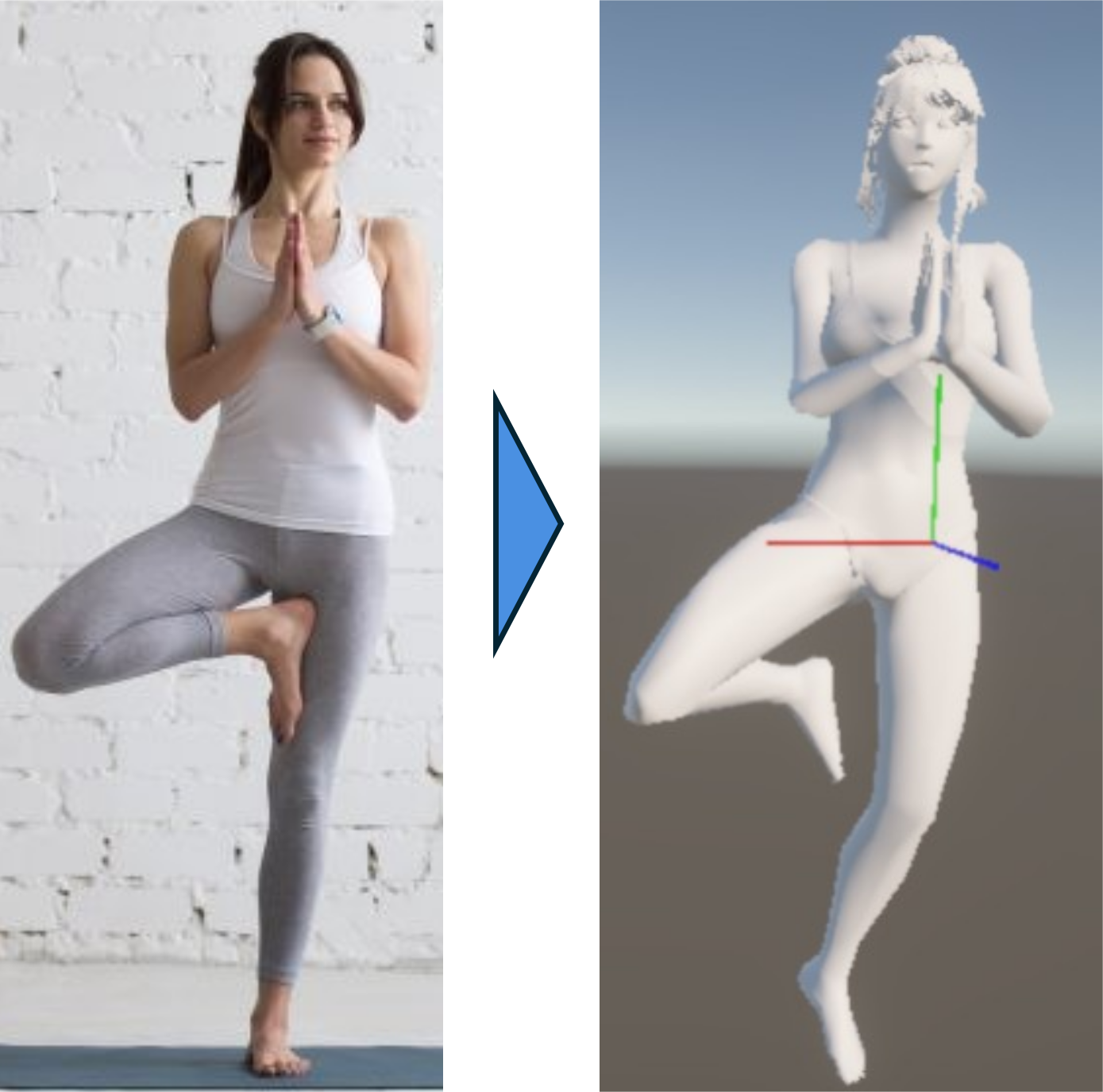
▲ No install — build a pose from a photo and rotate it to any angle
Unlike most pose apps where you pose the model by hand, Pose Mirror can also build the pose automatically from a photo. Drop in one image and the person's pose maps onto a 3D model — then just rotate. As a pose viewer, it's an easy way to hunt for the drawing angle you want.
App version vs web version (how to choose)
- Build in detail, use props or multiple models → app versions like Magic Poser / Easy Pose
- Check a pose in the browser right now, no install → Pose Mirror (web)
- Turn a photo's pose into a rotatable 3D reference → Pose Mirror (photo-based + pose viewer)
A good workflow is "check quickly in the browser first, move to an app if you need more." For a full comparison, see Best Free 3D Pose Reference Web Apps for Artists (2026).
How to use Pose Mirror (3 steps)
- Grab a photo — or pick from the built-in preset pose library.
- Drop it in — AI reads the joints onto a 3D model.
- Rotate and refine — spin to your angle, nudge joints with buttons, export as PNG or save as JSON.
FAQ
Q. Is there a free pose app? A. Yes. For phone apps there's Magic Poser, Easy Pose, and others; for a no-install web version there's Pose Mirror. Pose Mirror is free with no sign-up and builds a pose from a photo.
Q. Can I make poses without installing an app? A. Yes. Pose Mirror is browser-based, so there's no install. It works from any desktop or phone browser — just open the page.
Q. Can I use it as a pose viewer to rotate a photo's pose? A. Yes. Pose Mirror lets you rotate a pose built from a photo, so even a front-only shot can be viewed from the side, at an angle, or from behind.
Wrapping up
"Pose app" sounds like it means installing something, but a browser-based web version needs zero setup. Free, no sign-up, and it builds poses from photos — try Pose Mirror as a pose viewer first.
Try it now: Open Pose Mirror — one photo, no login, and your 3D pose is ready.
Related: